"Prospect Email W"S -vs- an email address on the prospect field?

When creating a list view on the projects tab, I am trying to see only active projects with customer's that DO NOT have an email address in the system. While creating the list view, it gave me the option to filter by the "Prospect Email WS".
I chose this field to filter as equals "".
Got a list view, spot checked a few records and realized that a lot of these actually do have email addresses.
A) What could I have done wrong?
B) How is the field "Prospect Email WS" different than just checking the prospect page for an email address?
-
Official comment

Hi Tiffany,
Great question! The Prospect Email WS Field is used for sending automated Emails to the Prospect. This Field may or may not be populated depending upon if their Project meets the Workflow Criteria for the Email Address to be populated, and an Email Alert sent to the Prospect. Check your system's Workflow Rules on the Project Object to see the Criteria of when that Prospect Email WS Field would be populated.
When creating a List View the system can only use Fields from that specific Object as Filter Criteria, so you would not be able to use a Prospect Field when creating a Project List View. That said, you can use a Formula Text Field to pull a Text version of the Prospect's Email address onto the Project Object. If you aren't familiar with creating Custom Fields, here is a 5min video on Creating Custom Fields
- You'll navigate to Setup > Create > Objects > Projects
- Click the New button in the Custom Fields and Relationships section
- Choose a Formula field, with an output Value of Text
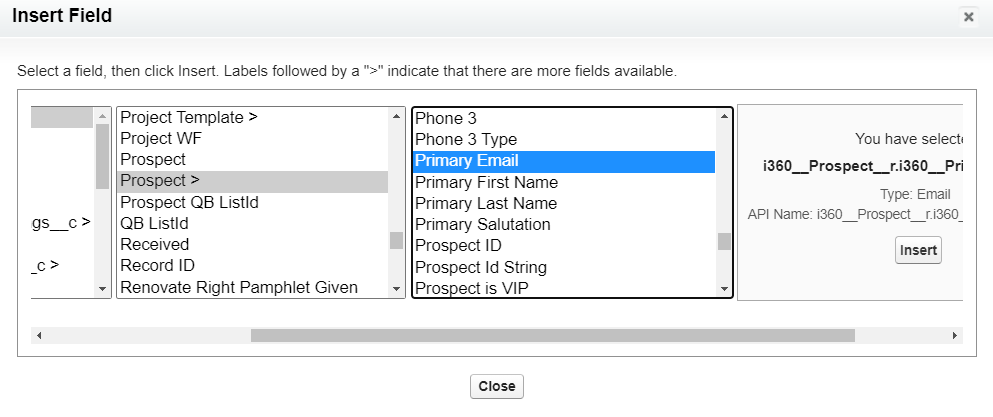
- Click Insert Field
- look to the Related Prospect, Prospect > (see screen shot below)
- Then choose the Prospect's Primary Email Field and click Insert
Save your new Custom Text Field
The new plain Text Email Address Field can then be pulled into any List Views on the Projects Tab.
Thanks for the question!
Please sign in to leave a comment.
Comments
1 comment